
How to Deploy The Security Bulldog- Direct, Through Your MSP, or Managed by Us
Deploying The Security Bulldog boils down to three options:
- Direct Deployment: Your team manages everything, offering full control.
- MSP-Facilitated Deployment: A Managed Service Provider (MSP) integrates and supports the platform while your team focuses on remediation.
- Fully Managed Deployment: The Security Bulldog team handles setup, monitoring, and threat response, ideal for teams with limited resources.
Each option caters to different levels of expertise, resources, and operational needs. Direct deployment is fast, requires technical skills, and offers full control. MSP deployment balances internal and external efforts, while fully managed services provide hands-off, round-the-clock protection.
Here’s how to choose the right fit for your organization.
The 3 Deployment Options for The Security Bulldog
The Security Bulldog provides three deployment models, designed to match your team’s management abilities and the level of external support you may need. These options let you fine-tune how threat intelligence automation fits into your operations. The decision comes down to how much hands-on control your team wants and whether you’d like to tap into external expertise.
Each option is powered by the same advanced natural language processing (NLP) engine, which processes millions of documents daily. While the core technology stays the same, the differences lie in who manages the platform and how much of the operational workload your team handles. Let’s break down the three models to see how they align with your needs.
Direct Deployment
This option puts your team in the driver’s seat. You’ll handle platform configurations and integrate custom feeds yourself. With an onboarding process that takes less than a minute, this model is perfect for organizations with a dedicated cybersecurity team that wants full control over their threat intelligence workflows.
MSP-Facilitated Deployment
Here, a Managed Service Provider (MSP) takes on the initial threat screening, leaving your internal team to focus on remediation tasks based on the tickets the MSP generates. The MSP also ensures The Security Bulldog integrates seamlessly into your existing security tools and routes alerts directly into your PSA ticketing systems. This approach blends external expertise with your team’s efforts, streamlining threat intelligence and operational support.
Fully Managed Deployment
This model is all about convenience. The Security Bulldog team handles everything – from setup and daily operations to 24/7 proactive threat monitoring. It’s an excellent choice for organizations dealing with ticket backlogs or lacking round-the-clock monitoring capabilities. The external team takes care of threat hunting, triaging, and responses, freeing up your staff to focus on other tasks while ensuring continuous threat intelligence coverage .
How to Deploy The Security Bulldog Directly
Deploying The Security Bulldog directly gives you full control over its setup and integration. However, this approach is best suited for teams with advanced expertise in Linux, container management, and network configuration. Your team will be responsible for everything – from the initial setup to customizing threat intelligence feeds.
Prerequisites and Planning
Before diving into deployment, ensure your system meets the necessary requirements. You’ll need a dedicated physical or virtual machine running Red Hat Enterprise Linux (RHEL) 9.x on an x86/x64 architecture. At a minimum, the machine should have 4 CPU cores, 4 GB of RAM, and 40 GB of storage. For optimal performance, 8 GB of RAM and 64 GB of storage are recommended.
Your team should have strong skills in RHEL system administration, Podman container management, and network configuration, including VLANs, DNS, and firewall rules. Additionally, you’ll need to obtain a unique license key by registering at the DCX portal and contacting support@guarddog.ai. Keep in mind that each container requires its own non-transferable license.
Proper network setup is essential. Configure all host network interfaces with IP addresses, Subnet, Gateway, VLAN, and DNS settings before running the installation script. Enable port mirroring for both incoming and outgoing traffic to allow the container to perform accurate assessments and protection. At least one DHCP IP must also be available, as the container is designed to operate with dynamic IPs. Refer to the "GDAI Configuration for Firewall Rules" document to ensure all necessary communication ports are open prior to deployment.
Installation and Configuration Steps
To begin the installation, run the official one-liner script:
curl -fsSL https://raw.githubusercontent.com/guarddog-dev/GUARDDOG-AI-Documentation/main/Deployment%20scripts/gdai_install.sh | sudo bash You’ll need to provide three parameters: DEVICE_NAME, EMAIL, and LICENSE.
Once the container is up and running, it will enter an initial synchronization phase. During this time, the NLP engine will begin building a curated OSINT knowledge base tailored to your environment. The platform processes and filters millions of documents daily to identify threats that are specifically relevant to your industry and IT setup.
Post-Deployment Configuration
After deployment, you can configure custom feeds tailored to your team’s roles and integrate them with your existing cybersecurity workflows. This can help automate threat detection and significantly reduce manual research efforts – by as much as 80%. The platform’s NLP engine will continue refining the OSINT knowledge base to align with your organization’s industry, profile, and IT environment.
Use the intelligence gathered to prioritize vulnerabilities that pose the greatest risk to your system. During the first few hours of operation, monitor the platform’s performance closely and fine-tune feed configurations based on your team’s feedback. This will help ensure the system operates effectively. With the direct deployment phase complete, you can move on to reviewing its integration into your broader cybersecurity strategy in the next sections.
How to Deploy The Security Bulldog Through an MSP
Using a Managed Service Provider (MSP) to deploy The Security Bulldog strikes a balance between control and convenience. You maintain oversight of your security operations while the MSP takes care of installation, setup, and ongoing maintenance. This is a great option for teams that may not have in-house technical expertise but still want visibility into their security processes.
Choosing an MSP Partner
Start by assessing MSPs based on their technical expertise in your industry. An MSP familiar with your sector – be it healthcare, finance, or manufacturing – can tailor The Security Bulldog to meet compliance requirements from the start. Look at case studies, client reviews, and any industry awards to evaluate their experience.
Financial stability is also essential to ensure long-term support. When vetting potential partners, attend demos that address your specific operational needs rather than generic sales presentations. The MSP should also integrate seamlessly with your existing storage and security systems to avoid disruptions.
Ask about their support services – do they offer proactive assistance, dedicated onboarding teams, and extended-hour support? Confirm that they use Role-Based Access Control (RBAC) to minimize access to sensitive data and enforce least-privilege access during deployment.
Once you’ve chosen the right MSP, the next step is a structured onboarding process.
Onboarding and Integration Process
Onboarding typically takes 4–6 weeks and begins with a comprehensive questionnaire. This covers your IT environment, cybersecurity tools, hardware inventory, user roles, and compliance requirements. MSPs generally dedicate 40 to 80 hours to onboarding a new client, though automation tools can cut this time by 30% to 40%.
The process kicks off with a formal meeting where the MSP introduces their technical team, defines roles and responsibilities, sets up communication protocols, and aligns on project milestones. A detailed infrastructure audit follows to uncover vulnerabilities or legacy issues before deploying The Security Bulldog. This audit is critical, as 35.5% of data breaches in 2024 were linked to third-party vulnerabilities.
"When MSPs don’t fully understand a client’s requirements and systems upfront, it often leads to misunderstandings and underestimated complexities." – Lilia Tovbin, CEO & Founder, BigMailer.io
During integration, the MSP connects The Security Bulldog to your existing tools, such as Remote Monitoring and Management (RMM) and Professional Services Automation (PSA) platforms. They will deploy software agents across your devices – servers, workstations, and mobile devices – to enable proactive monitoring.
Before going live, the system undergoes rigorous stress or penetration testing. The MSP will also train your team on using The Security Bulldog and handling emergencies. A 30-day review post-launch ensures everything runs smoothly and addresses any early issues.
Working with Your MSP
To maintain security, clearly define access boundaries and responsibilities. Specify which systems the MSP can access and ensure they use secure jump hosts and multi-factor authentication (MFA) for administrative tasks. Provide only the minimum access required for their work, and ensure all actions are traceable through individual credentials or service tickets for quick resolution of any issues.
For urgent security matters, set up a protocol for phone communication instead of relying on email or ticketing systems to ensure immediate response. Both parties should collaborate on an incident response plan with secure, independent communication channels. The MSP should log all activity, while your organization – or an independent reviewer – regularly examines these logs for suspicious behavior. It’s recommended to retain event logs for at least 18 months for thorough investigations.
While the MSP monitors for issues like unusual login patterns or privilege escalation attempts, your internal security practices must remain strong. Automation can reduce the MSP’s workload by up to 40%, allowing them to focus on proactive security improvements rather than reactive fixes. Choose an MSP that values feedback and has clear protocols for open, two-way communication.
sbb-itb-9b7603c
How to Deploy The Security Bulldog as a Fully Managed Service
Opting for a fully managed deployment means The Security Bulldog team takes care of everything – from installation to monitoring, threat hunting, and incident response. This approach eliminates the burden of daily cybersecurity management, making it an ideal solution if your team is facing a cybersecurity skills gap (a challenge reported by 67% of organizations as of 2025) or if you need to prioritize internal resources for your core business operations.
Preparing for Handoff
Before handing over control, you’ll need to prepare your environment. Start by setting up dedicated service accounts with permissions for Active Directory, LDAP, DNS, and DHCP. This enables User Behavior Analytics and log collection. Ensure your servers meet the minimum requirements – 4 CPU cores and 8–16 GB of RAM – for running data collectors.
You’ll also need to provision servers for key components like collectors and orchestrators, which enable active threat response. Conduct a complete inventory of all devices and assets within your scope to ensure nothing slips through the cracks once the service goes live. For an initial Security Posture Assessment, deploy security agents on at least 80% of your assets, including workstations and servers.
To avoid disruptions, whitelist The Security Bulldog’s security agent in your current endpoint protection, antivirus software, and SSL inspection tools. If your compliance or investigative needs require log retention beyond the standard 13-month period, set up daily data archiving to Amazon S3. Finally, activate administrative accounts on the provider’s platform to simplify ongoing management.
Once these steps are complete, you’re ready to follow the deployment timeline for a smooth transition.
Deployment Timeline and Process
The first 90 days are crucial for setting up a fully managed deployment. Here’s a breakdown of key milestones:
- Days 1–15: Complete account setup, hardware provisioning, and asset inventory.
- Days 16–30: Install collectors and activate accounts.
- Days 31–60: Deploy security agents across all endpoints.
- Days 61–75: Integrate forensic sources such as Active Directory, LDAP, firewalls, DNS, web proxies, VPN, and cloud services.
- Days 76–90: Wrap up with a Security Posture Assessment and fine-tune detection rules.
"To ensure you get the most out of your first 90 days… it’s important to understand your deployment tasks and create a plan for deployment." – Rapid7
During this phase, configure inactivity alerts to notify your team if any event source stops sending logs. This ensures continuous visibility and helps you catch issues early.
Once deployment is complete, ongoing management takes over to maintain robust protection and quick threat response.
Management and Support Services
After deployment, The Security Bulldog’s Security Operations Center (SOC) provides 24/7 monitoring across your endpoints, networks, and cloud environments. A team of expert analysts works around the clock to hunt for malicious activity, investigate alerts, validate threats, and take direct actions, such as isolating compromised accounts or devices, when necessary.
The managed service also handles routine maintenance tasks like applying security patches, monitoring system performance, and ensuring operational stability. You’ll receive regular vulnerability assessments, phishing awareness training, and compliance monitoring for frameworks such as NIST, HIPAA, and SOC 2. Additionally, AI-driven tools enhance protection by using machine learning for predictive defense, behavioral analysis, and automated threat responses.
"Cybersecurity is no longer just an IT issue; it is a business-critical imperative." – Deloitte
This level of support is critical, especially considering that ransomware accounted for 44% of all data breaches in 2025, a 37% increase from the prior year. Managed security services can cut incident response times by up to 50%, giving your organization a major edge in mitigating threats while allowing your team to focus on what matters most – your business.
Comparing the 3 Deployment Methods
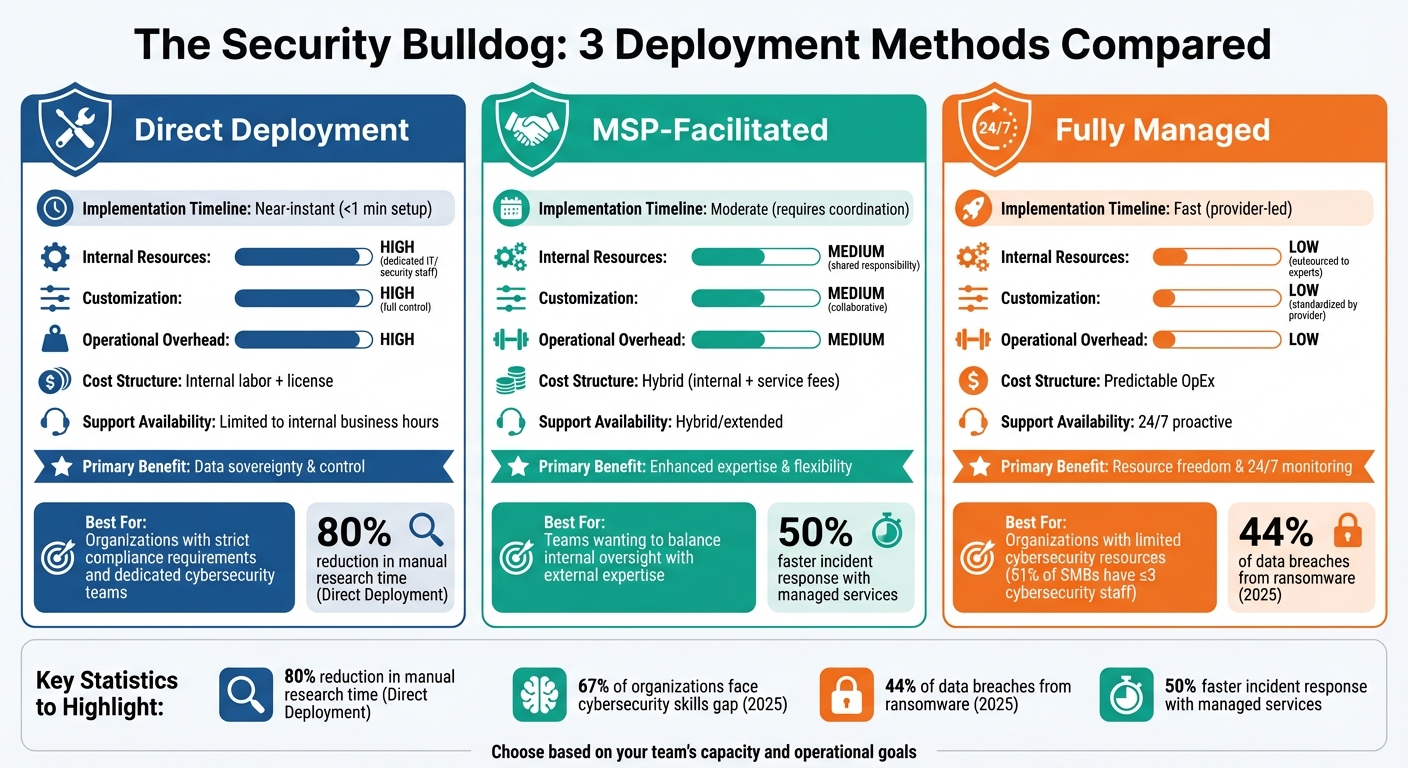
Security Bulldog Deployment Methods Comparison: Direct vs MSP vs Fully Managed
When deciding on a deployment method, your choice boils down to balancing your organization’s resources, control needs, and budget. Each option comes with its own trade-offs, offering different levels of control, expertise, and cost. Here’s a closer look at the three main approaches.
Direct deployment offers full control over your infrastructure and data. However, it demands a dedicated IT team to handle daily operations. This method is best suited for organizations with strict compliance requirements or concerns about data sovereignty, where maintaining complete control is a top priority.
MSP-facilitated deployment strikes a balance between internal management and external expertise. While your team retains oversight of daily operations, a Managed Service Provider (MSP) steps in to provide critical support like monitoring, threat intelligence, and incident response. This collaborative model strengthens security by blending your internal knowledge with specialized external skills.
Fully managed deployment takes the burden off your internal team by entrusting 24/7 monitoring and threat hunting to expert providers. This approach turns unpredictable security costs into consistent operational expenses, making it a great fit for organizations with limited cybersecurity resources. In fact, 51% of SMBs have three or fewer people dedicated to cybersecurity. By outsourcing, businesses can focus their internal efforts on strategic priorities while relying on external specialists for round-the-clock protection.
Here’s a breakdown of how these methods compare:
Deployment Methods Comparison Table
| Feature | Direct Deployment | MSP-Facilitated | Fully Managed |
|---|---|---|---|
| Implementation Timeline | Near-instant (<1 min setup) | Moderate (requires coordination) | Fast (provider-led) |
| Internal Resources | High (dedicated IT/security staff) | Medium (shared responsibility) | Low (outsourced to experts) |
| Customization | High (full control) | Medium (collaborative) | Low (standardized by provider) |
| Operational Overhead | High | Medium | Low |
| Cost Structure | Internal labor + license | Hybrid (internal + service fees) | Predictable OpEx |
| Support Availability | Limited to internal business hours | Hybrid/extended | 24/7 proactive |
| Primary Benefit | Data sovereignty & control | Enhanced expertise & flexibility | Resource freedom & 24/7 monitoring |
Each method serves a different need – whether you’re looking for complete control, a collaborative setup, or a fully outsourced solution. Choose the one that aligns best with your organization’s goals and capabilities.
Conclusion
Selecting the best deployment method for The Security Bulldog isn’t about finding a one-size-fits-all solution – it’s about aligning with your specific needs. Cybersecurity teams across the country face constant pressure, with limited time to manage endless alerts. That’s why your decision should focus on addressing your team’s capacity and operational goals.
Each deployment option brings its own set of advantages. For example, direct deployment can cut down manual research time by as much as 80%, with onboarding that takes less than a minute – ideal for teams overwhelmed by manual tasks. If your organization partners with an MSP, the MSP-facilitated approach simplifies your security tools while tapping into external expertise to boost efficiency. And for teams with limited in-house cybersecurity resources, the fully managed deployment takes the workload off your shoulders entirely, allowing you to focus on higher-level priorities. These tailored approaches ensure you can find a solution that fits your specific resource limitations.
When evaluating your options, consider your team’s bandwidth and focus on what delivers the most impact. As Brenda Buckman from Huntress wisely states:
"Clients don’t care about features – they care about staying safe and stress-free."
To truly understand how each deployment method can improve your operations, take advantage of The Security Bulldog’s free trial or demo. This hands-on experience will help you determine which approach aligns best with your organization’s needs.
Choosing the right deployment method isn’t just about implementation – it’s about solving one of cybersecurity’s biggest challenges: the constant battle against time.
FAQs
What should I consider when deciding how to deploy The Security Bulldog: directly, through an MSP, or fully managed?
When planning how to implement The Security Bulldog, it’s crucial to assess your organization’s resources, expertise, and objectives. If your team has solid technical capabilities and a strong grasp of cybersecurity, opting for direct deployment allows for greater control and tailored customization. On the other hand, if your team lacks the necessary in-house expertise or you’d prefer to concentrate on core business functions, partnering with a Managed Service Provider (MSP) or selecting a fully managed solution can simplify operations while ensuring professional oversight.
Your specific security needs and the complexity of your systems should also guide your decision. For environments that are highly sensitive or technically intricate, a fully managed deployment can provide expert setup, continuous support, and rapid threat response. Cost considerations are another important factor: direct deployment might require upfront investments in infrastructure and staff training, whereas MSP and fully managed options often come with flexible subscription-based pricing. Ultimately, your choice should align with long-term priorities, like enhancing automation, improving threat detection, and streamlining operations.
What’s the difference between onboarding directly and through an MSP?
The onboarding process for deploying The Security Bulldog depends on whether you opt for direct deployment or work with a Managed Service Provider (MSP).
If you choose direct deployment, your team takes charge of everything. This means configuring the platform, integrating threat intelligence tools, and customizing AI-driven features to fit your specific needs. This option works best if your organization has the technical expertise and resources to handle the setup internally.
On the other hand, an MSP-facilitated deployment takes the load off your shoulders. The MSP handles the entire process – from configuring the platform and aligning it with your security policies to providing ongoing management and support. This is a great choice for businesses without dedicated cybersecurity teams, as it ensures a smooth setup with minimal effort required on your end.
The key difference is who manages the setup: your team in direct deployment or the MSP in a managed deployment. The MSP route offers a more hands-off experience, which can be appealing for many organizations.
What are the key advantages of choosing a fully managed deployment of The Security Bulldog?
Choosing a fully managed deployment of The Security Bulldog comes with several standout advantages. It equips your organization with advanced threat detection and response tools, powered by AI-driven automation, which can greatly enhance your security team’s efficiency. On top of that, you’ll benefit from constant updates to threat intelligence – without needing to allocate significant internal resources or technical know-how.
This approach is perfect for businesses aiming to simplify their cybersecurity processes while staying focused on their main objectives. By entrusting a team of specialists to handle the solution, you gain both confidence and strong protection against the ever-changing landscape of cyber threats.